AI Search Visibility
How We Fixed Our Own AEO in a Single Day by Leaving Webflow for Astro

 Miguel FernándezFounder & CTOatOmnia
 Daniel EspejoFounder & CEOatOmnia
TL;DR
Most brands are invisible in AI responses without realizing it, as AI engines tend to repeatedly surface the same 2–3 brands in any given category. This post gives you a practical 5-step process — from asking real decision prompts to analyzing citations — to understand where your brand stands in just a few minutes.
In this article:
AI visibility has moved from theory to reality. It already shapes how people decide. ChatGPT, Gemini and Perplexity read across the web, interpret the context and return a single answer that feels confident and complete. That answer influences which brands people trust and which ones never enter the conversation.
The uncomfortable part is that most teams have no idea how visible they are. They assume their SEO work carries over into AI, but it rarely does. Across the audits we run, only a small fraction of the URLs cited by these engines overlap with Google’s top results for the same query. The engines behave differently, trust different sources and reward different signals.
The good news is that you can get your first visibility signal in less than five minutes. Once you see it, it becomes clear why the old search mindset does not work in this environment.
Here is how to run the check, what to look for and what the results actually mean.
Open ChatGPT, Gemini or Perplexity and ask the kind of question a real customer would ask before choosing a product.
If you sell insurance: “Which home insurance brand is best for families in Spain?”
If you sell skincare: “Which moisturiser is best for sensitive skin?”
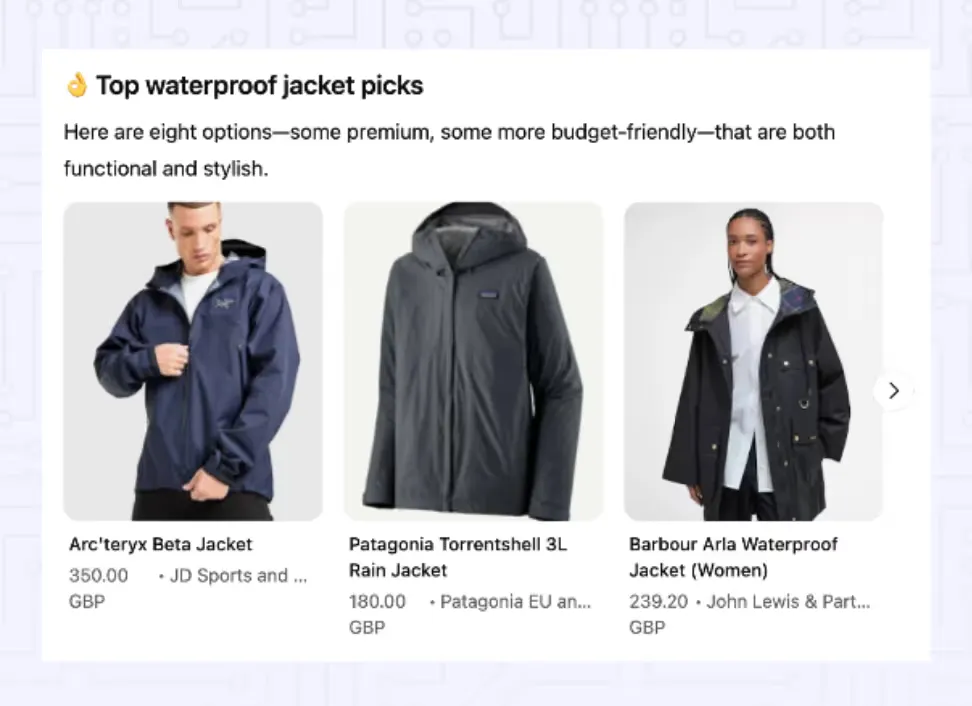
If you sell jackets: “What’s a good waterproof jacket that actually looks decent?”
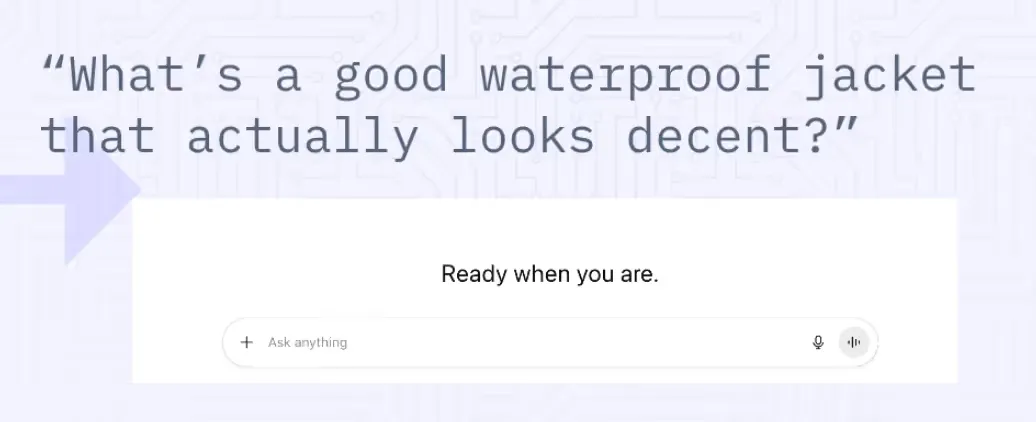
These are decision prompts. They sit closest to real buying intent, which makes them a clean way to see how the model understands your category.
When the answer comes back, focus on four things:
Even this single step tells you more about your AI footprint than most analytics dashboards today.
A pattern we see across categories: models tend to mention the same two or three brands repeatedly, even when the wording of the prompt changes. If you are not in that cluster, you are not in the shortlist users assume is “the market”.
If your brand appears, read the description closely. Models do not invent these summaries out of nowhere. They combine what they find across your site, third party sources and any high confidence pages that cover your category.
Two things are worth paying attention to.
The tone and accuracy
If the description sounds outdated or incomplete, the model is reading sources that do not represent you properly. This often comes from older pages you have forgotten exist or from third party sites you do not control.
The reasoning behind the mention
Models often reveal why they chose you. Some brands get mentioned because of pricing clarity, others because of strong support content, others because of consistent definitions used across multiple pages.
If you are not mentioned at all, that is also data. It means you are outside the model’s current trust circle for that prompt. The model is not convinced you belong in the answer and is choosing safer, more consistent alternatives.
Now look at who does appear. These are your real competitors in AI visibility. Not only the ones who outrank you in Google, but the ones the model wants to cite when a user needs an answer.
Most teams are surprised by this list. A challenger brand with clean, consistent information will often beat incumbents with more traditional SEO authority.
Click the citations. This is where the underlying logic becomes visible.
You will notice two things quickly.
Many cited pages are not top search results
Across the analyses we run, only around 11 to 15 percent of URLs cited by AI engines overlap with Google’s top ten. This is why treating AEO like SEO does not work. The model cares about clarity and corroboration more than keyword signalling.

External domains appear again and again
In most categories, engines tend to rely on a smaller and random mix of sources:
These sources shape the answer more than most brands realise.
Your goal is not only to improve your own pages. It is to understand which external sources the model already trusts and make sure your brand shows up there accurately.
Repeat this test various times in different AI conversations, and you already have enough to map three core signals.
Share of Voice
The percentage of times your brand appears for that question compared with others.
Brand ranking
Where you sit in the model’s mental hierarchy. First mentioned, later in the answer or not at all.
Evidence
Which sources the model is leaning on and whether any of them represent you well.
These three signals form the basis of AEO. You cannot improve what you cannot see, and these signals are the starting point of visibility work.
A small insight from audits: improving Share of Voice rarely comes from rewriting a homepage. It usually comes from fixing the sources the model actually reads.
Checking one prompt manually is easy. Checking ten is tedious. Checking all the prompts that matter, across three engines, in several markets, and tracking how they change over time is not realistic without help.
AI answers change as models update, new sources emerge, competitors refresh content and engines adjust their reasoning. If you only look at a couple of prompts occasionally, you miss most of the movement.
This is the gap a visibility layer is meant to cover. Omnia was built for that. It shows how often you appear, how you are described, which sources engines trust and how your Share of Voice moves over time.
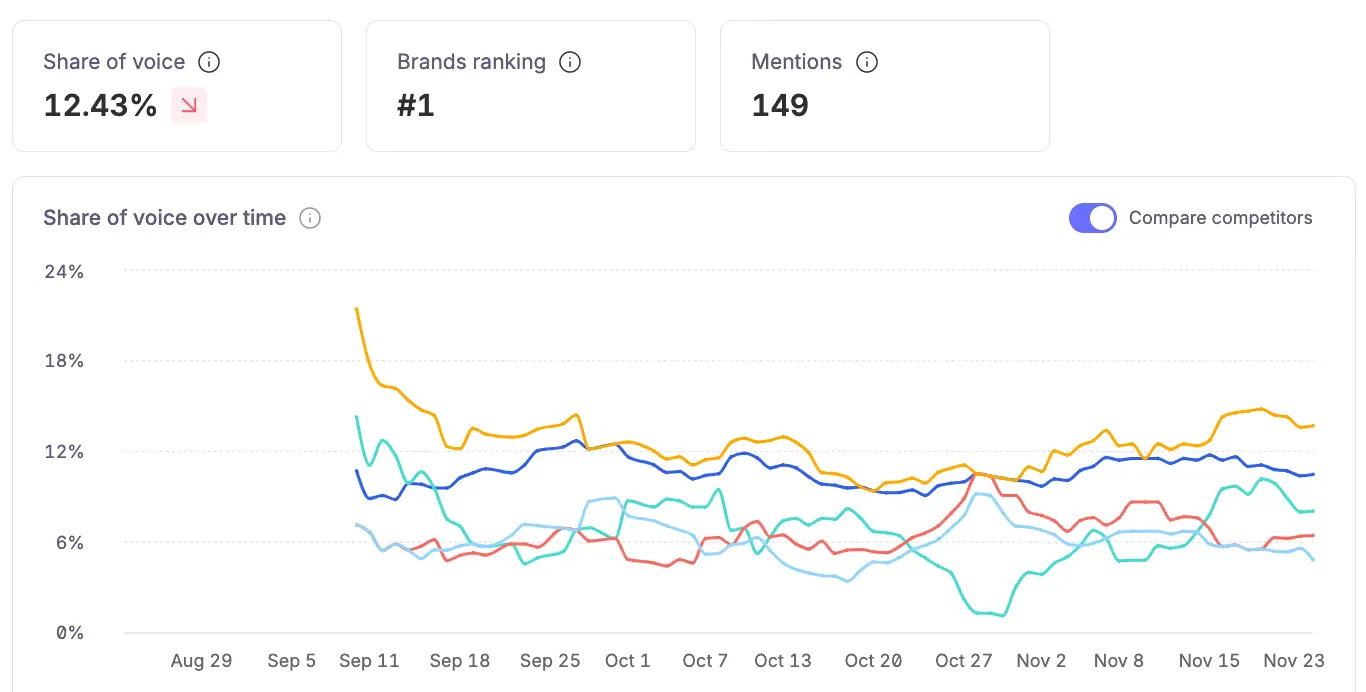
You can try Omnia free for 14 days, with no credit card required. It takes a few minutes to see how visible you really are.
AI visibility changes faster than search ever did. A one time test gives you a signal. A weekly routine gives you control.
When you monitor answers regularly, you can see:
Think of it as moving from guesswork to observation. Visibility becomes something you can adjust, not something that happens to you.
After running your first check, three things usually stand out.
Even this small test changes how most teams think about their category.
Search is slowly being absorbed into answer engines. The same questions that used to appear in Google now start inside ChatGPT, Gemini or Perplexity. Instead of ten blue links, users get one confident answer.
That answer shapes perception. It sets the mental shortlist. It influences what users assume is true about the category. Visibility inside the answer layer is becoming the new top of the funnel.
The challenge is that no traditional metric captures this. You cannot rely on rankings or impressions. You need to see what the model actually says and why.
Most brands only realise they have an AI visibility problem when they run their first decision prompt and discover they are missing from the conversation entirely.
Checking your visibility in AI engines is straightforward. Ask a decision prompt and see if you appear. That five minute test gives you a first look at your real position in a space where decisions already happen.
If you want the full picture and a reliable way to track it across engines, you can automate the process with Omnia. The trial is free and does not require a credit card.
It is a clearer way to understand how visible your brand really is, and what you need to fix next.
Omnia offers a 14-day free trial on the Growth plan.
No credit card required. See exactly where your brand shows up (or doesn't) across AI engines, then let the platform's recommendations guide your next move.
Written By
 Daniel EspejoFounder & CEOatOmniaMiguel FernándezFounder & CTOatOmnia
 Jose Luis García del RíoGrowthatOmnia
 Jose Luis García del RíoGrowthatOmnia
 Miguel FernándezFounder & CTOatOmnia
 Jose Luis García del RíoGrowthatOmnia
No credit card required · Free for 14 days · See your AI visibility within 3 minutes