AI visibility software that tells your team what to do next
Omnia shows where your brand appears in AI answers, which competitors appear instead, and which sources influence those recommendations. Track the prompts that matter, compare visibility by market, inspect the evidence, and turn the gaps into work your team can ship. Work in the Omnia app, or connect Claude, ChatGPT or Cursor through the Omnia MCP and ask for your visibility, citations and projects in the same conversation.
No credit card required. Free for 14 days.
Choose Omnia when visibility data needs to lead to a decision
Omnia connects four decisions in one workflow:
- Which buyer prompts and markets need attention.
- Where your brand appears and where competitors win instead.
- Which pages and domains shape the answer.
- What to create, refresh, publish, or fix next.
The result is a monitored view of AI visibility with an evidence-backed work queue, not a score without a reason.
For the category definition and a wider tool comparison, read The Best AI Visibility Platform in 2026.
Does Omnia have an MCP server for Claude, ChatGPT and Cursor?
Yes. The Omnia MCP connects Claude, ChatGPT, Cursor and other AI assistants to your Omnia visibility data and Projects board. Ask a question in plain language and get the answer from your own monitored prompts.
Omnia monitors your prompts daily on the AI engines in your plan. Through the MCP, your assistant can read the results: visibility, share of voice, citations, competitor benchmarks, prompts, topic trends and sentiment. It can also create prompts, manage topics and tags, and list, create or move Projects. You sign in with OAuth, and access follows your workspace and permissions.
| Your role | Ask your assistant | What you get back |
|---|---|---|
| SEO and content leads | "Find which third-party sites drive our AI citations." | The domains and URLs behind your citations, so you can choose the next brief or placement. |
| In-house marketers | "Summarize our AI visibility for the last 7 days and flag any drops or gains." | A summary with changes against the previous week, ready for a leadership update. |
| Agencies | "Compare our share of voice with a named competitor over 30 days." | The share-of-voice trend for the client brand against one competitor. |
Connecting takes a few steps and no code. The MCP complements the Omnia dashboard, which stays available for visual exploration and team reporting. See how the Omnia MCP works.
Find the prompts where a competitor is taking the shortlist
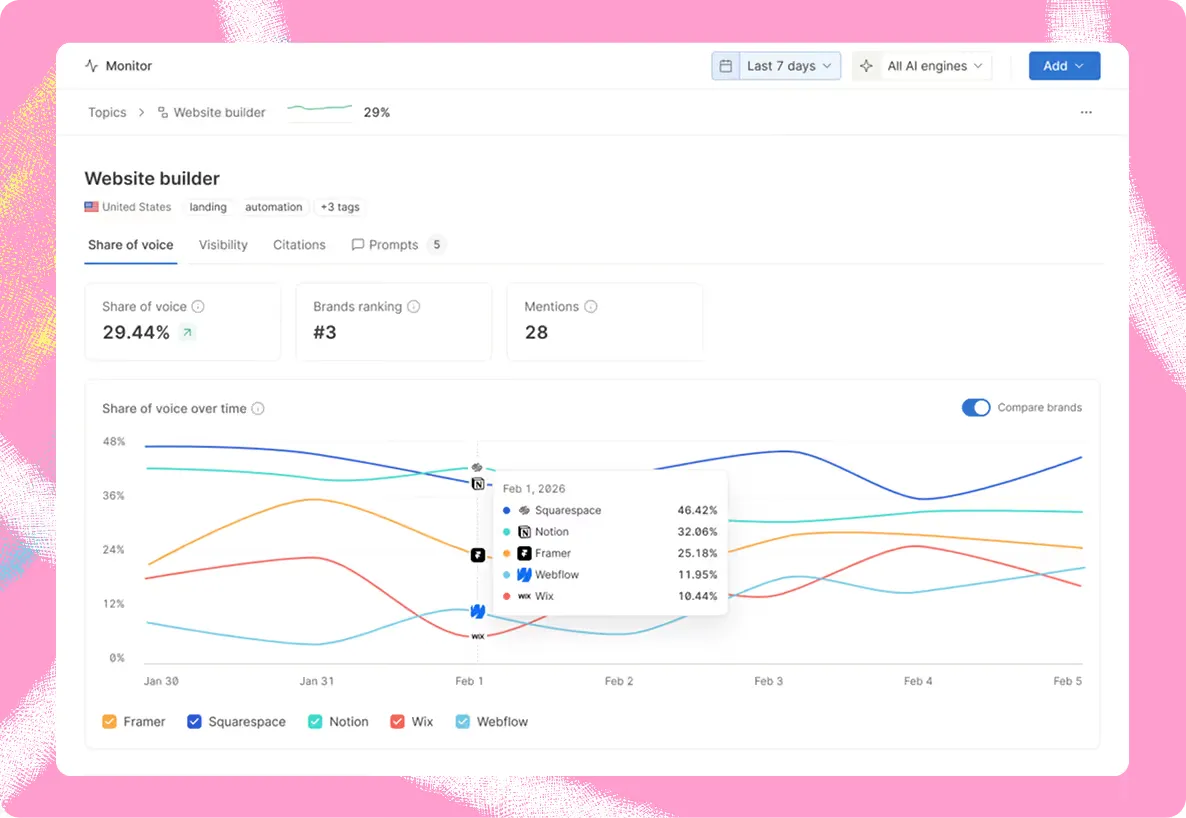
Track branded and non-branded prompts across the AI engines available to your plan. See visibility and share of voice by prompt, engine, country, and language.
 Separate being known by name from being recommended when a buyer asks a category question.
- Compare your position with named competitors on the prompts that matter to your growth goals.
- Keep the prompt and answer evidence behind the metric so the team can investigate a change.
See the sources behind the answer
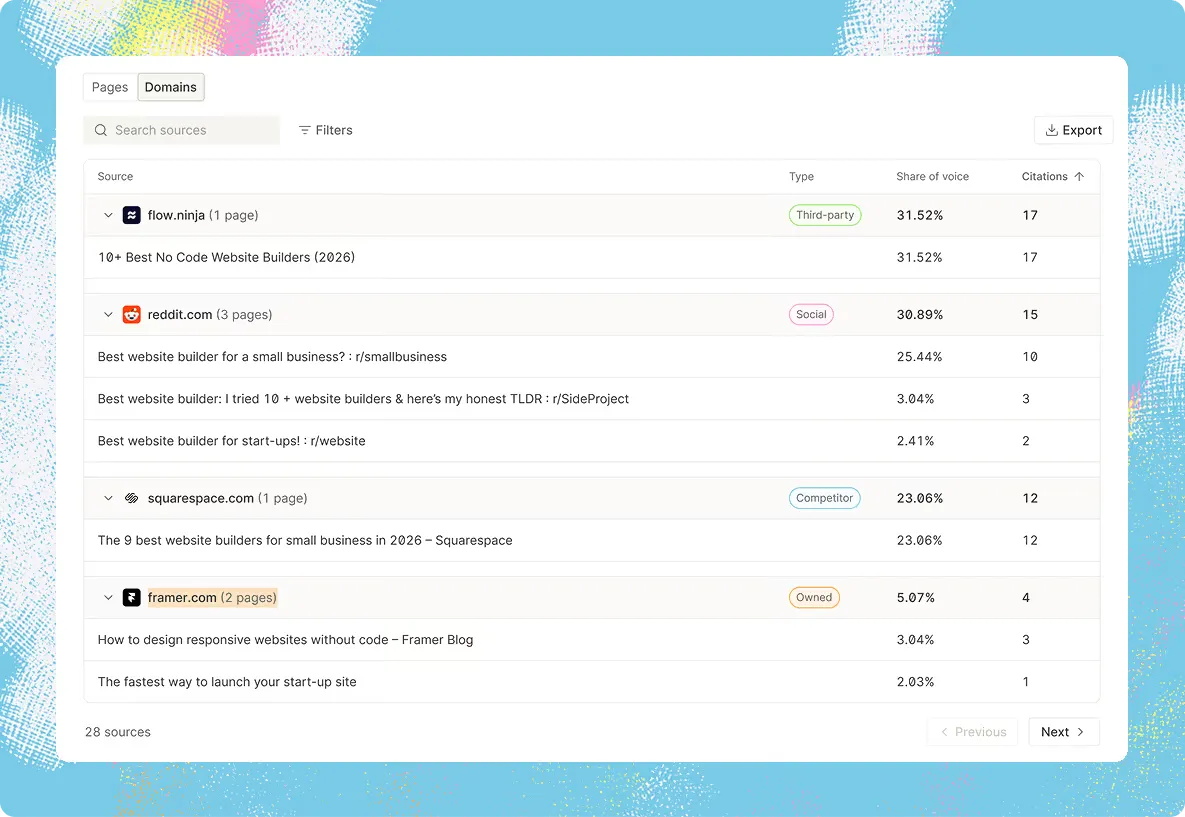
Omnia shows the URLs and domains cited in AI answers, alongside the prompt and response where they appeared.
- See whether the useful source is your own page, a competitor page, or a third-party publication.
- Decide whether the gap calls for a content change, a technical fix, or an earned placement.
- Use citation evidence to explain why a recommendation changed.
Monitor, diagnose, act, measure
Use the same prompts and evidence to connect an AI visibility signal to the next piece of work.
Select the prompts, competitors, and markets tied to your growth goals.
Start with the questions buyers ask and the competitors they compare.
Monitor how supported AI engines answer those prompts over time.
Review visibility, share of voice, mentions, sentiment, and cited sources where available.
Identify where your brand is absent, losing share of voice, or described inaccurately.
Focus the team on a gap with a clear commercial or reputational consequence.
Read the cited URLs and domains that shape the answer.
Use the page type and source pattern to choose the right response.
Create the content, distribution, or technical work that addresses the gap.
Turn the finding into a brief, refresh, placement target, or fix.
Recheck the same prompts and compare the next movement.
Measure whether the work changed visibility, citations, or the way AI represents the brand.

SEO & Content Leads
 Use non-branded prompts and competitor citations to choose the next content brief.
- See which pages and domains already influence answers.
- Focus the team on prompts it can realistically improve.
- Ask Claude or ChatGPT which sites drive your citations through the Omnia MCP.

In-house Marketers
- Give leadership a clear view of how AI represents the brand by market and prompt.
- Tie changes in visibility, share of voice, sentiment, and citations to shipped work.
- Turn monitoring into priorities your team can act on.
- Ask your AI assistant for a seven-day visibility summary to share with leadership.

Agencies
- Standardize prompt monitoring across clients and markets.
- Compare competitors and cite the evidence behind recommendations.
- Turn findings into reports and deliverables clients can understand.
- Compare share of voice with a named competitor from the same conversation.
What you can see in Omnia
- Prompt-level AI answers and response snapshots.
- Brand mentions, visibility, and share of voice.
- Competitor comparisons by prompt and engine.
- Citation URLs and domains.
- Sentiment about the brand and its features, where available.
- Country and language differences.
- Your visibility data and Projects board inside Claude, ChatGPT or Cursor through the Omnia MCP.
Engine availability, prompt limits, exports, and other plan details are listed on pricing.
Choose the next step that fits your buying stage
Check your current visibility first. Run a free report in ChatGPT and Google AI Mode and see your prompts, share of voice, cited sources, and two immediate actions. Use the free AI visibility checker.
Connect your AI assistant. Use Claude, ChatGPT or Cursor to ask about your visibility and work your Projects board. Read the Omnia MCP setup guide.
Compare Omnia with other platforms. Review side-by-side comparisons for AI visibility tools, including citations, engine coverage, and action capabilities. Compare Omnia with alternatives.
See plans and start monitoring. Choose a plan based on prompt coverage, engines, exports, and team needs. View pricing.
Start with a clear view of your AI visibility
No credit card required. Free for 14 days.
Frequently Asked Questions
Who is Omnia for?
Omnia is for SEO and content leads, in-house marketing teams, startups, scale-ups, and agencies that need to monitor AI visibility and turn the findings into content, distribution, or technical decisions.
What can I use Omnia to measure?
Omnia measures how your brand appears in monitored AI answers, including visibility, share of voice, competitor presence, cited URLs and domains, and sentiment where available. Results can be compared by prompt, engine, country, and language.
Which AI engines can Omnia track?
Omnia tracks supported AI engines including ChatGPT, Perplexity, Google AI Overviews, and Google AI Mode. Additional engines can depend on the plan and account configuration. See the current engine list on the pricing page.
Can I use Omnia from Claude, ChatGPT or Cursor?
Yes. The Omnia MCP connects Claude (Desktop, Claude Code and Cowork), ChatGPT through an official connector, Cursor, VS Code, Windsurf, Microsoft Copilot and other MCP-compatible clients to your Omnia data. You sign in with OAuth, and access follows your workspace and permissions.
Can the Omnia MCP change anything, or is it read-only?
It can do both. You can query visibility, share of voice, citations, competitor benchmarks, prompts, topic trends and sentiment. You can also create prompts, manage topics and tags, and list, create or move Projects to their next status.
Do I need to write code to connect Omnia to my AI assistant?
No. Connecting takes a few steps and no code: get an Omnia account, connect your assistant to the hosted Omnia MCP server, and start asking questions. The Omnia MCP page has the setup steps.
Does Omnia replace traditional SEO tools?
No. Traditional SEO tools measure rankings, organic traffic, links, and website signals. Omnia measures how AI engines answer category questions, which brands appear, and which sources they cite. The two views answer different questions and work together.
How is Omnia different from a free AI visibility checker?
The free checker gives you a point-in-time report. Omnia is the ongoing workflow for monitoring selected prompts, comparing movement, reviewing citations, and deciding what to do next.
Can agencies monitor multiple brands?
Yes. Omnia is designed for teams and agencies that need to track, report, and share AI visibility data across brands and markets. Plan limits and export access are listed on the pricing page.
Where can I learn how AI visibility platforms are evaluated?
The AI visibility platforms guide covers category definitions, evaluation criteria, and a broader comparison of tools. This page focuses on deciding whether Omnia fits your team.