Run every client in one place
Brands, countries and languages are unlimited on every plan. Plans differ by the number of prompts monitored (Omnia pricing page, checked 5 November 2026).

Omnia is an AI visibility platform for agencies that run AI search visibility for several clients. It monitors each client's prompts every day in ChatGPT, Perplexity, Google AI Overviews and Google AI Mode, and exports the data for your reports. The Omnia Agent drafts the work you approve.

Trusted by growing agencies












Tracking tells you where a client shows up in AI answers. Winning means knowing which page to ship, update or earn next.
 You’re manually checking prompts and collecting screenshots, which does not scaleReporting is inconsistent across clients, markets, and enginesYou can’t clearly prove why a competitor shows up (or what to do next)Strategy sounds like “best practices” instead of evidence from citationsYou spend too much time building reports and not enough time shipping outcomesClients ask for exports, raw data, and transparency, and it’s hard to deliver

 Track AI visibility by country, topic, and prompt across clientsShow competitive Share of Voice and visibility with clear changes over timeUse citation intelligence (URLs and domains) to justify recommendationsTurn data into deliverables: content to create, places to publish, fixes to shipExport data for dashboards, client reporting, and internal analysisPackage AI visibility into a clear monthly service with measurable impact
Omnia gives agencies one place to run AI visibility across clients.
Brands, countries and languages are unlimited on every plan. Plans differ by the number of prompts monitored (Omnia pricing page, checked 5 November 2026).
Growth monitors 25 prompts, Pro monitors 100 and Enterprise monitors 200 or more (Omnia pricing page, checked 5 November 2026).


Export visibility, Share of Voice and citation data as CSV or NDJSON, or pull it through the API, to load into Sheets, Looker Studio or your own dashboards.
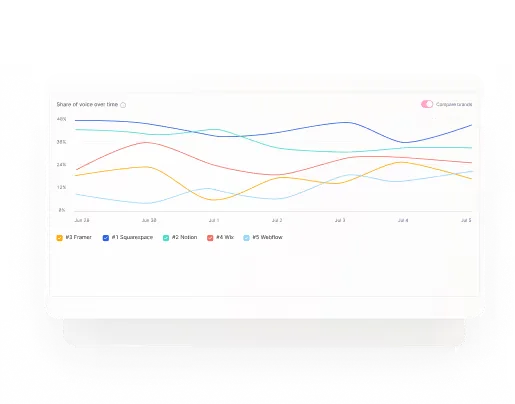
Sentiment shows how AI engines describe each feature versus competitors, as endorsed, neutral or undermined, with the sentence behind each score.

Pro adds Slack support to the chat and email support on every plan (Omnia pricing page, checked 5 November 2026).
Three workflows take you from a prompt set to a client report.

Build prompt libraries per category and adapt them by client and country.
 Result
Repeatable setup across clients and faster onboarding.

Show the citations powering AI answers, then translate them into a plan: what to publish, where to place it, and what to fix on-site.
ResultLess subjective debate, more confident execution.

Report visibility, Share of Voice and citation changes by market, on the cadence your clients expect.
ResultClients see progress in the metrics that matter, not in vanity dashboards.
Client visibility scorecards by countryCompetitive Share of Voice trendsGap prompts list (where competitors show and client doesn’t)Top citations to target (by URL and domain)Branded vs non-branded performanceChange over time for stakeholder updates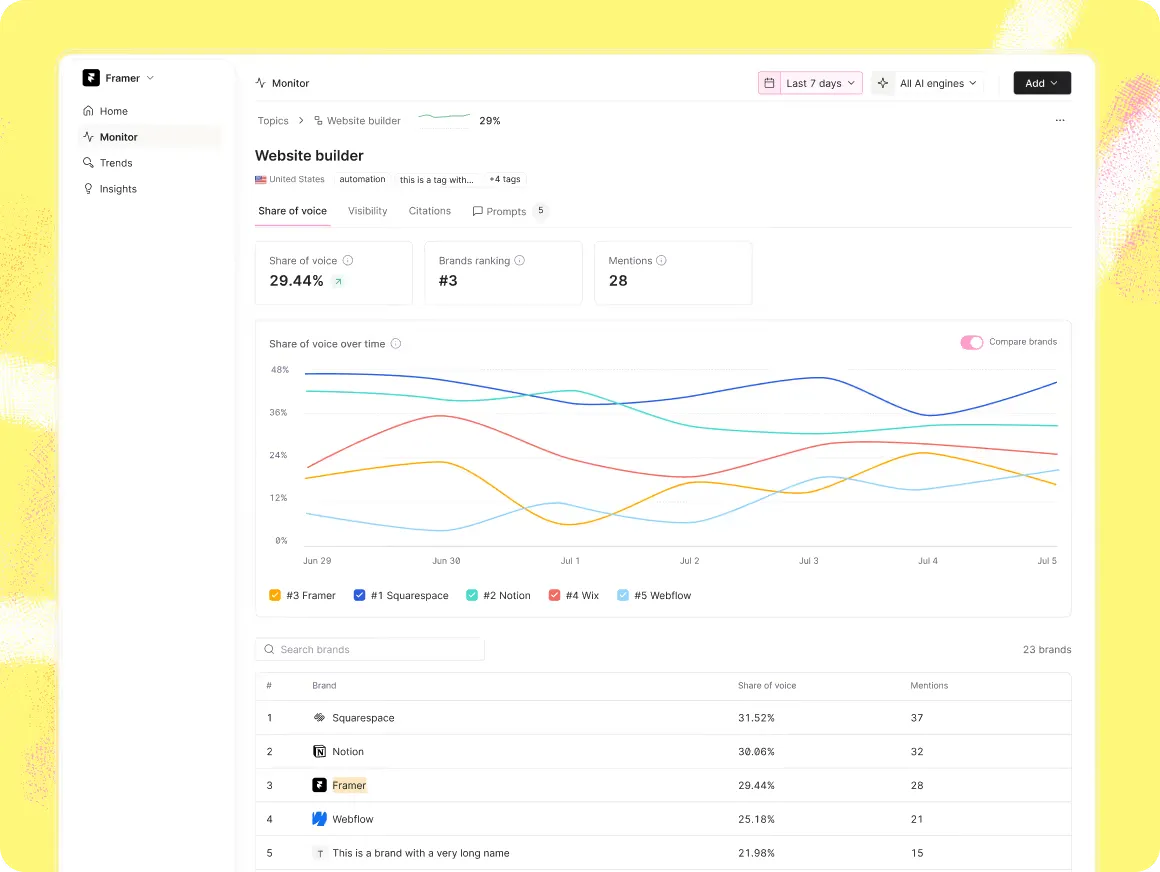
 Multi-market monitoring for client expansions, one country per prompt, in roughly 250 countriesChatGPT, Perplexity, Google AI Overviews and Google AI Mode on every plan, with Claude, Gemini and Bing AI Mode on requestCompetitor benchmarking and sentiment trackingCitation extraction (URLs and domains), with placement targets based on what AI engines citeThe Omnia Agent, which drafts briefs and fixes you approveData Export and API for reporting automation

Omnia has a page for each role on your team.

 Track visibility and share of voice by prompt and countrySee which URLs and domains get cited, and whyTurn content gaps into briefs and outlines
 Understand where you show up in AI engines, by marketPrioritize prompts you can actually winGet a clear next step, not dashboard noise
With Omnia, INDYA moved from #11 to #2 on a tracked AI prompt in under seven days.
No credit card required · Free for 14 days · Type your domain and get proposed prompts in minutes
Short answers to what agencies ask before they start.
The best AI visibility tool for an agency monitors every client daily, covers the main AI engines, shows the cited URLs and exports clean data for reports. Omnia monitors prompts every day in ChatGPT, Perplexity, Google AI Overviews and Google AI Mode. Brands, countries and languages are unlimited on every plan, and Data Export gives you CSV or NDJSON, so AI search visibility for agencies fits into the client reports you already send. Plans start at €79 a month (Omnia pricing page, checked 5 November 2026). For nine tools compared on cost per client, engines and client reporting, see our guide to the best AI visibility tools for agencies.
Both. Agencies use Omnia to run monitoring for several clients, export data for client reporting and turn the gaps into work they bill for. In-house teams use the same product for their own brand.
Yes. Brands, countries and languages are unlimited on every plan, and plans differ by the number of prompts monitored: 25 on Growth, 100 on Pro and 200 or more on Enterprise (Omnia pricing page, checked 5 November 2026). Check the prompt limits against your client count before you choose a plan.
Start with about 25 high-intent prompts across 5 to 10 topics in the client's main market. Add more countries once the first results are shipping.
Report what you can measure: visibility, Share of Voice and citation changes, next to assisted conversions, demo mentions and pipeline influence from your own analytics. The point is to show movement in the decision layer.
Yes. AI answers vary by country, and Omnia runs each prompt in one country at a time, in real browsers and locations, in roughly 250 countries. Report results by country so each client sees their own markets.
Yes. Data Export gives you visibility, Share of Voice and citation data as CSV or NDJSON, and the API lets you pull it into your reporting stack, such as Sheets or Looker Studio.
Compare the prompts where competitors appear and the client doesn't with the citations behind those answers, and each gap becomes a task: content to create, pages to refresh, placements to earn. The Omnia Agent turns the gaps into suggested projects and drafts the work, and you approve what ships.
Report the change in visibility, Share of Voice and citations for the same prompts over the same period, per client and country, and name the work you shipped in between. Omnia keeps history for each prompt, so reports show movement instead of screenshots.