AI Search Visibility
AI Brand Monitoring: How to Track Brand Mentions in AI Search

 Alfredo BernalOrganic Growth LeadatOmniaAlfredo BernalOrganic Growth LeadatOmnia
TL;DR
Most AI visibility work starts with ChatGPT and Google. Microsoft's AI answers get less attention, even though they appear in Bing, in Copilot and inside Windows and Microsoft 365.
The good news is that Microsoft gives you more data than anyone else. Bing Webmaster Tools reports which of your pages its AI cites and the searches it ran to find them. Bing launched that report in February 2026, months before Google added AI reporting to Search Console in June, which counts impressions only.
This guide covers what changed between Copilot and Bing AI Mode, and six steps to get your brand cited in both.
Microsoft now answers questions with AI in three places, and all three retrieve their sources from Bing's search results:
Microsoft treats them as one family: its October 2026 content preferences apply the same grounding controls to AI Mode, AI Overview, Copilot and Microsoft 365.
Because Copilot now requires a sign-in, Omnia replaced Copilot with Bing AI Mode in its monitored engines on November 9, 2026, as explained in Omnia's product update. Bing AI Mode reflects what a typical buyer sees more closely.
For your strategy, the three behave as one channel: they share Bing's index, and Bing Webmaster Tools reports their citations together.
Verify your site in Bing Webmaster Tools first, because it's the only first-party source of data on how Microsoft's AI cites you. If your site is already in Google Search Console, you can import it in a few clicks.
Then open the AI Performance report. Microsoft launched it in public preview on February 10, 2026, covering citations across Microsoft Copilot, AI-generated summaries in Bing and select partner integrations. It reports:
| Metric | What it shows |
|---|---|
| Total citations | How often your pages appear as sources in AI answers |
| Average cited pages | How many of your pages are cited per day, on average |
| Grounding queries | The phrases the AI used to retrieve the content it cited (a sample) |
| Page-level citations | Which of your URLs are cited most |
| Visibility trends | How your citations change over time |
Microsoft added intents, topics, citation share and a compare view in June 2026. Citation share is your share of all citations shown for a grounding query, and it doesn't reveal which other domains are cited. Two more limits matter: the report doesn't show clicks, and it doesn't separate Copilot from Bing or name the partner integrations.
Check that Bing has indexed the pages your buyers would want cited, because Microsoft's AI can only cite what's in Bing's index. Ranking in Google doesn't mean Bing has your pages.
Use the AI Performance report to see which of your pages Microsoft's AI already trusts, and for which searches. Grounding queries are the phrases the AI searched for before citing you, so they show the sub-questions it's trying to answer.
Look for three patterns:
Structure each page so the AI can lift a clear answer from it. In the AI Performance announcement, Microsoft lists what helps pages get cited:
In practice, start each section with a one- or two-sentence answer to its heading, then expand. Put comparisons and pricing in tables rather than paragraphs.
Earn coverage on the third-party pages Microsoft's AI already cites for your category. Your own pages are only part of the answer.
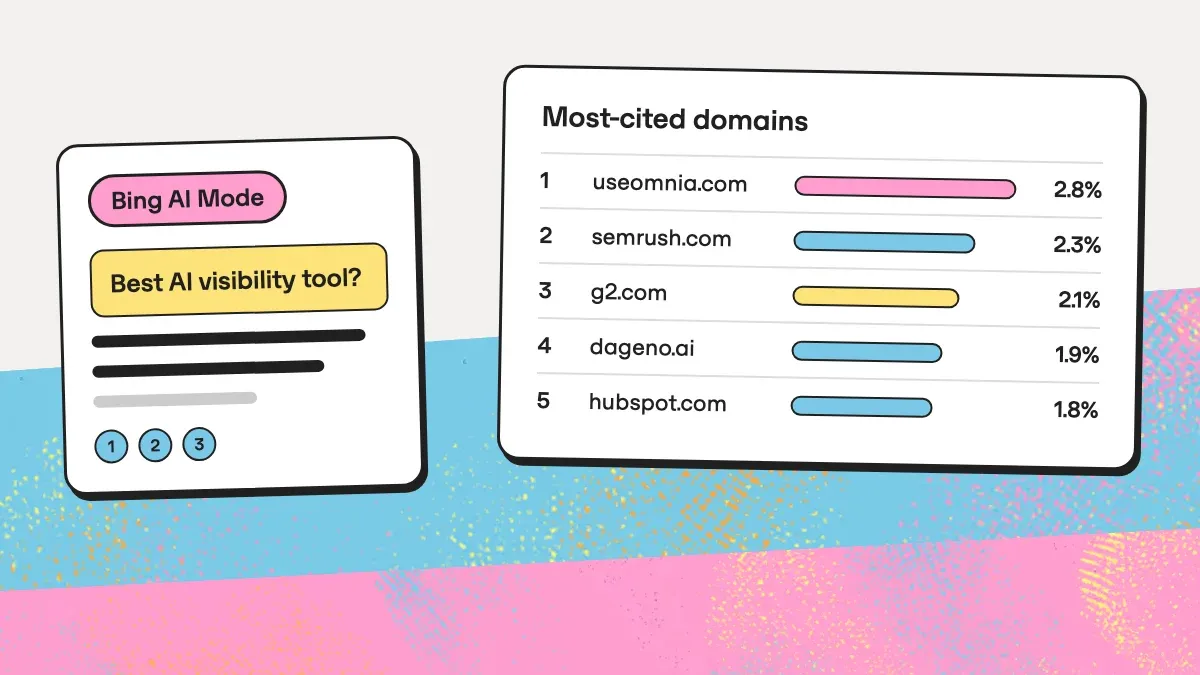
Omnia monitors non-branded prompts in its own category, AI visibility tools. From November 9 to 24, 2026, the most-cited domains in Bing AI Mode were:
| Rank | Domain | Share of citations |
|---|---|---|
| 1 | useomnia.com | 2.8% |
| 2 | semrush.com | 2.3% |
| 3 | g2.com | 2.1% |
| 4 | dageno.ai | 1.9% |
| 5 | hubspot.com | 1.8% |
Source: Omnia monitoring, non-branded prompts in the AI visibility tools category, Bing AI Mode, November 9 to 24, 2026.
Two things stand out. In Omnia's October to November monitoring of the same category, G2 ranked sixth in ChatGPT and tenth in Claude, so it ranks higher in Bing AI Mode. A complete, current G2 profile is worth the effort here.
The rest are other vendors and publishers in the category. Check which of their pages are cited for your prompts, and pitch the ones that cover competitors but not you.
Your own domain can lead too: useomnia.com topped the list for its own category. Build the list for your category from your own prompts. Our AI citation tracking guide explains how.
Track Microsoft's AI on its own, because its sources differ from Google's and ChatGPT's. Use two views together:
Run the same 10 to 20 buyer prompts every week and judge four-week trends. For tools that track this automatically, see our comparison of Copilot and Bing rank tracking tools.
Start this week: verify your site in Bing Webmaster Tools, turn on IndexNow, and note which pages the AI Performance report already shows as cited.
When you want to see the answers themselves, Omnia does most of that work, and you make the calls. Omnia monitors your prompts daily in real browsers, by country, in ChatGPT, Perplexity, Google AI Overviews and Google AI Mode, with Bing AI Mode, Claude and Gemini available on request. It shows where you're mentioned, which pages are cited down to the URL, and your share of voice against competitors.
Your Omnia Agent then works from that data. It finds the cited pages where competitors appear and you don't, and drafts the page updates, comparisons and pitches to close the gap. You approve what ships.
Start your 14-day free trial. No credit card needed.

Short answers to the questions people ask most about ranking in Copilot and Bing AI Mode.
No, Bing AI Mode isn't the same as Copilot, but both draw on Bing's search results. Copilot is Microsoft's assistant and now answers only signed-in Microsoft account users. Bing AI Mode is an AI answer mode in Bing search that anyone can see.
Yes, ranking in Bing helps, because Copilot and Bing AI Mode retrieve their sources from Bing's search results. A page Bing hasn't indexed can't be cited. Check your key pages in Bing Webmaster Tools, not only in Google Search Console.
No, Bing Webmaster Tools' AI Performance report shows citations, not clicks. It reports how often your pages are cited, which pages, and the grounding queries behind them. Track branded search and direct visits to see the effect on traffic.
IndexNow helps Microsoft's AI use the current version of your pages. Microsoft recommends it so search engines learn quickly when content is added, updated or removed. It speeds up discovery; it doesn't guarantee a citation.
Appearing in Bing AI Mode usually takes weeks. New or updated pages need to be indexed first, which IndexNow can speed up, and third-party coverage takes longer to build. Judge progress on a four-week trend in the AI Performance report and your prompt monitoring.
Written By
 Alfredo BernalOrganic Growth LeadatOmniaAlfredo BernalOrganic Growth LeadatOmnia
 Alfredo BernalOrganic Growth LeadatOmnia
 Alfredo BernalOrganic Growth LeadatOmnia
 Alfredo BernalOrganic Growth LeadatOmnia
 Alfredo BernalOrganic Growth LeadatOmnia
No credit card required · Free for 14 days · See your AI visibility within 3 minutes