AI Search Visibility
LLM SEO: What It Is and How to Do It (2026 Guide)

 Alfredo BernalOrganic Growth LeadatOmniaAlfredo BernalOrganic Growth LeadatOmnia
TL;DR
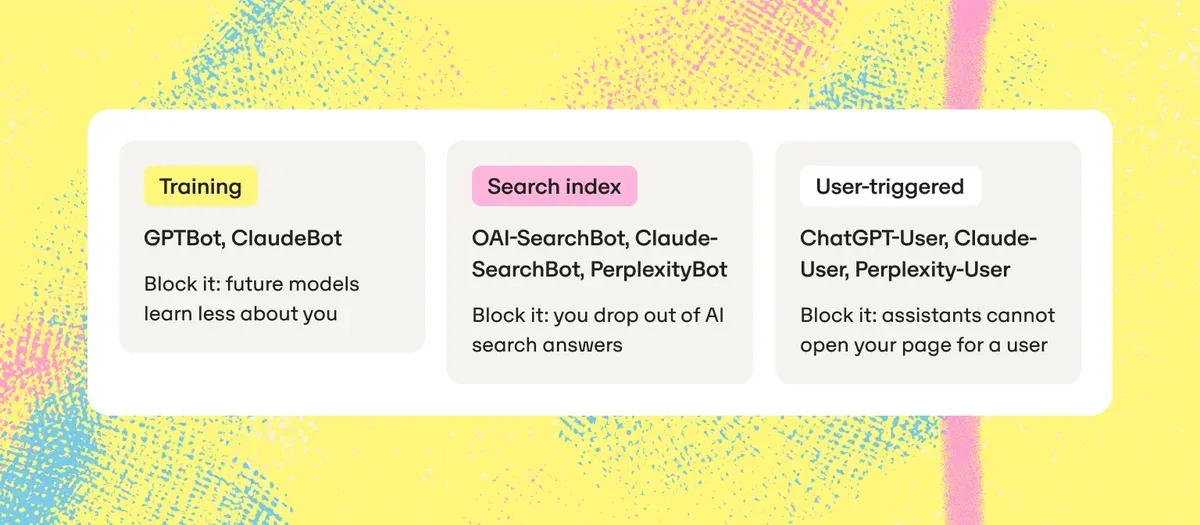
AI crawlers do three different jobs: collecting web data for AI training, building an index for AI-powered search, and fetching a page when a user asks an assistant to. If you want to appear in AI answers, allow the search and user-triggered bots, because blocking them removes you from those answers. Blocking training bots is a business decision with a cost: models learn less about you. Manage all of it in robots.txt, verify bots against published IP ranges, and serve your content in plain HTML, because most AI crawlers do not run JavaScript.
An AI crawler is an automated bot that AI companies send to fetch web content for their AI systems and products. They are often discussed as one group, but the major companies now run separate bots for separate jobs, and the job decides what blocking a bot actually does.
AI training crawlers collect public content that may be used to train future AI models, including large language models. Blocking them keeps your future content out of future model training. The cost is that models know less about your brand when they answer without searching.
Search crawlers build the index an AI assistant searches when it answers a question with live results. Blocking them is the fastest way to disappear from AI-generated answers.
User-triggered fetchers fetch a specific page because a person asked an assistant to open it, summarize it or check it. They behave more like a browser than a crawler. Blocking them stops assistants from reading your page on a user's behalf, so it cannot inform the answer that user sees.
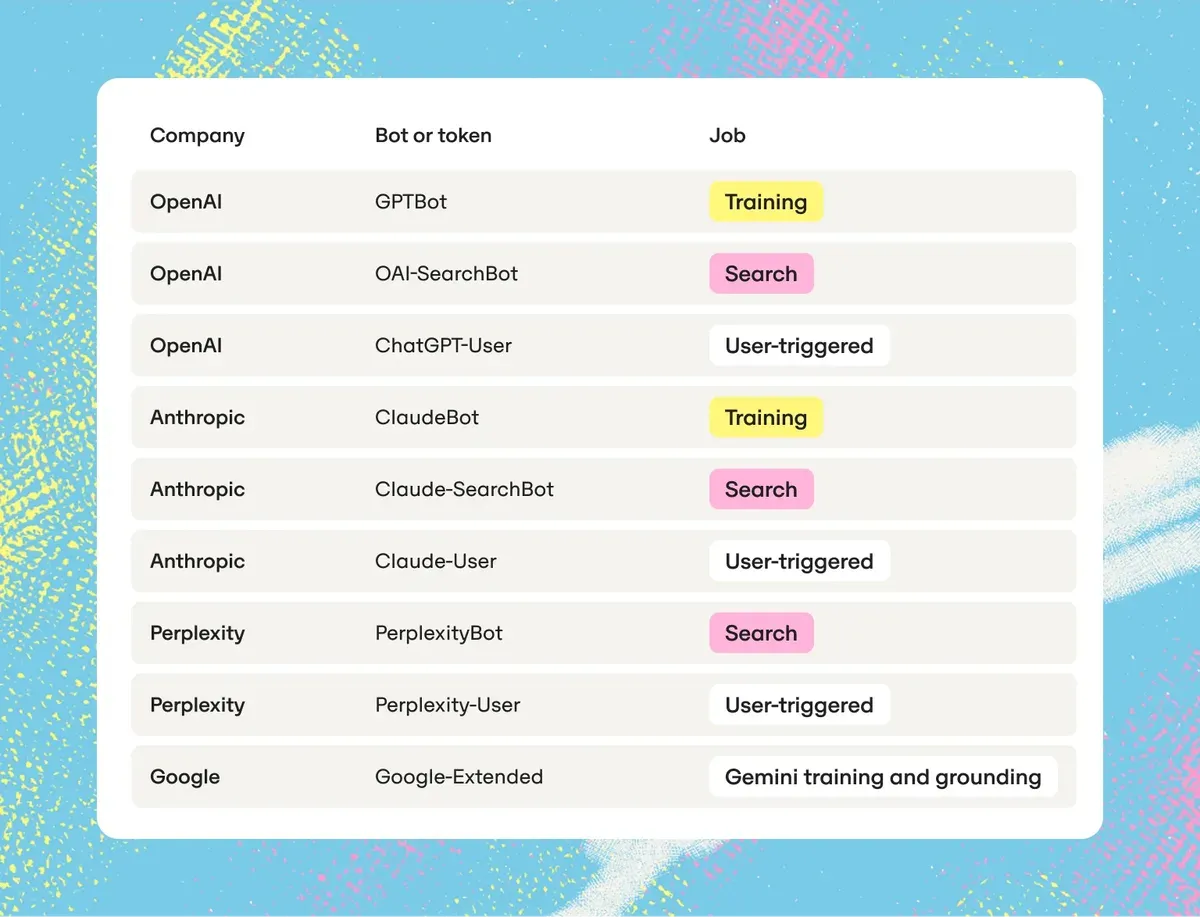
The details below come from each company's own documentation, which is where you should check before changing anything: new AI crawlers appear regularly, and crawler policies change.
| Company | Bot or token | Job | Robots.txt |
|---|---|---|---|
| OpenAI | GPTBot | Training | Followed |
| OpenAI | OAI-SearchBot | Search in ChatGPT | Followed |
| OpenAI | ChatGPT-User | User-triggered actions | May not apply, per OpenAI |
| Anthropic | ClaudeBot | Training | Followed |
| Anthropic | Claude-SearchBot | Search in Claude | Followed |
| Anthropic | Claude-User | User-triggered requests | Followed |
| Perplexity | PerplexityBot | Search index | Managed by robots.txt; see below |
| Perplexity | Perplexity-User | User-triggered requests | Generally ignored, per Perplexity |
| Google-Extended | Robots.txt token for Gemini training and grounding | Followed; does not affect Search |
OpenAI's crawler documentation treats each bot as a separate setting. GPTBot collects content that may be used to train OpenAI's models. OAI-SearchBot surfaces websites in ChatGPT's search features, and OpenAI says sites that opt out of it will not be shown in ChatGPT search answers, though they can still appear as navigational links. OpenAI notes that robots.txt changes can take about 24 hours to reach its search results.
ChatGPT-User handles certain actions users take in ChatGPT and custom GPTs. Because those actions are user-initiated, OpenAI says robots.txt rules may not apply, and it asks site owners to use OAI-SearchBot to manage search opt-outs. OpenAI also lists OAI-AdsBot, which checks the safety of pages submitted as ads in ChatGPT, and publishes IP ranges for each bot.
Anthropic's documentation describes three bots. Restricting ClaudeBot signals that a site's future content should be excluded from model training. Claude-SearchBot crawls content to improve search results, and blocking it may reduce your visibility in user search results.
Claude-User retrieves pages when people ask Claude questions, and blocking it prevents Claude from retrieving your content in response to a user query. Anthropic says its bots honor robots.txt, with no exception for user requests, and support the non-standard Crawl-delay extension. It also publishes the IP addresses its crawlers use.
Perplexity's documentation describes PerplexityBot as the bot that surfaces and links websites in Perplexity's search results, not one that collects training data, and gives robots.txt tags to manage it. Perplexity-User fetches pages for user requests, and Perplexity says that because a user asked for the page, it generally ignores robots.txt. Perplexity publishes IP ranges for both.
In August 2025, Cloudflare reported that when Perplexity's declared bots were blocked, Perplexity accessed content through undeclared crawlers that changed user agent strings, IP addresses and networks, and Cloudflare removed Perplexity from its verified bots list. In the same tests, Cloudflare said ChatGPT-User fetched the robots.txt file and stopped when it was disallowed.
Perplexity disputed the report, saying Cloudflare had attributed another service's traffic to it, and argued that AI assistants fetching pages for a specific user request should not be treated like crawlers. If you need certainty either way, use network-level controls.
Google-Extended is a robots.txt token, not a separate crawler: Google crawls with its existing user agents and reads the token only as a control. It lets site owners decide whether content Google crawls can be used to train its Gemini models and to ground Gemini's answers.
According to Google's crawler documentation, it does not affect a site's inclusion in Google Search or its rankings. AI Overviews and AI Mode are features of Google Search, managed with Googlebot and the usual snippet controls. Blocking Google-Extended therefore does not remove you from AI Overviews or AI Mode; blocking Googlebot would remove you from Search entirely.
Start from what you want, then set the bots to match.
| Your goal | What to do |
|---|---|
| Appear in AI answers | Allow the search and user-triggered bots of every engine you care about |
| Keep content out of model training | Block training crawlers only (GPTBot, ClaudeBot, Google-Extended); keep search bots allowed |
| Protect paid, private or licensed content | Block AI bots in robots.txt and enforce it at your CDN or web application firewall |
| Reduce server load | Use Crawl-delay where supported, and rate limits at your CDN |
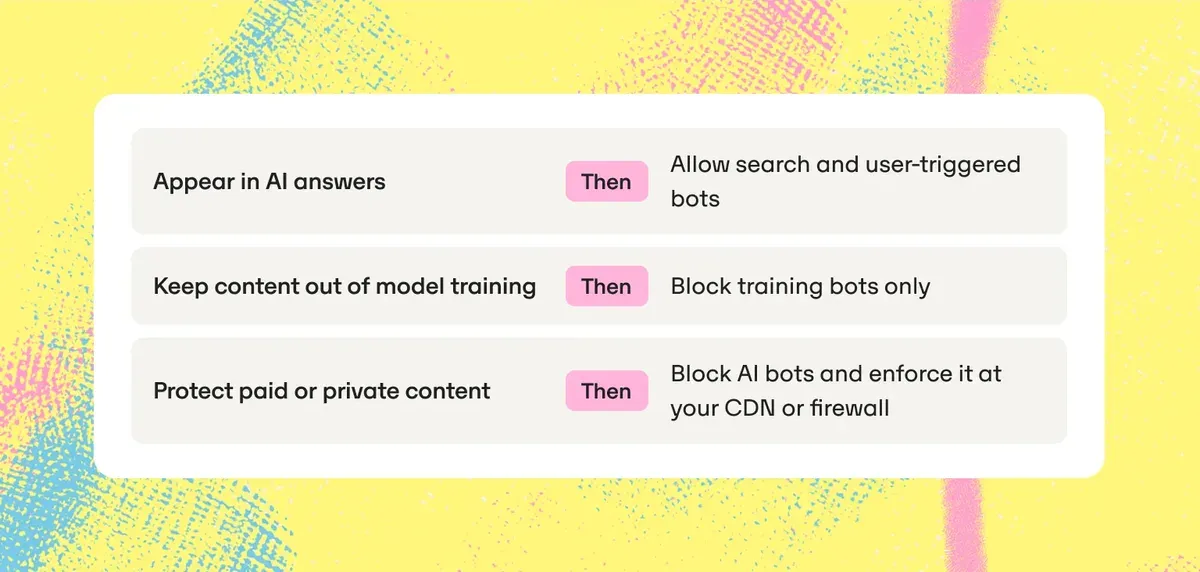
Some publishers, such as The New York Times, block OpenAI's training crawler. For most B2B SaaS companies and ecommerce sites, the answer is simpler: allow the search and user bots, because those are the bots that put you in AI answers, and make a deliberate choice about training bots.
Some practitioners argue against blocking training bots at all. Eduard Blacquière, an SEO and AI search consultant, lists "don't block AI training bots" (GPTBot, ClaudeBot, Google-Extended, CCBot) among the steps toward AI knowing your brand exists, in his AI search KPI framework presented at Search Central Live Deep Dive 2026 in Barcelona.
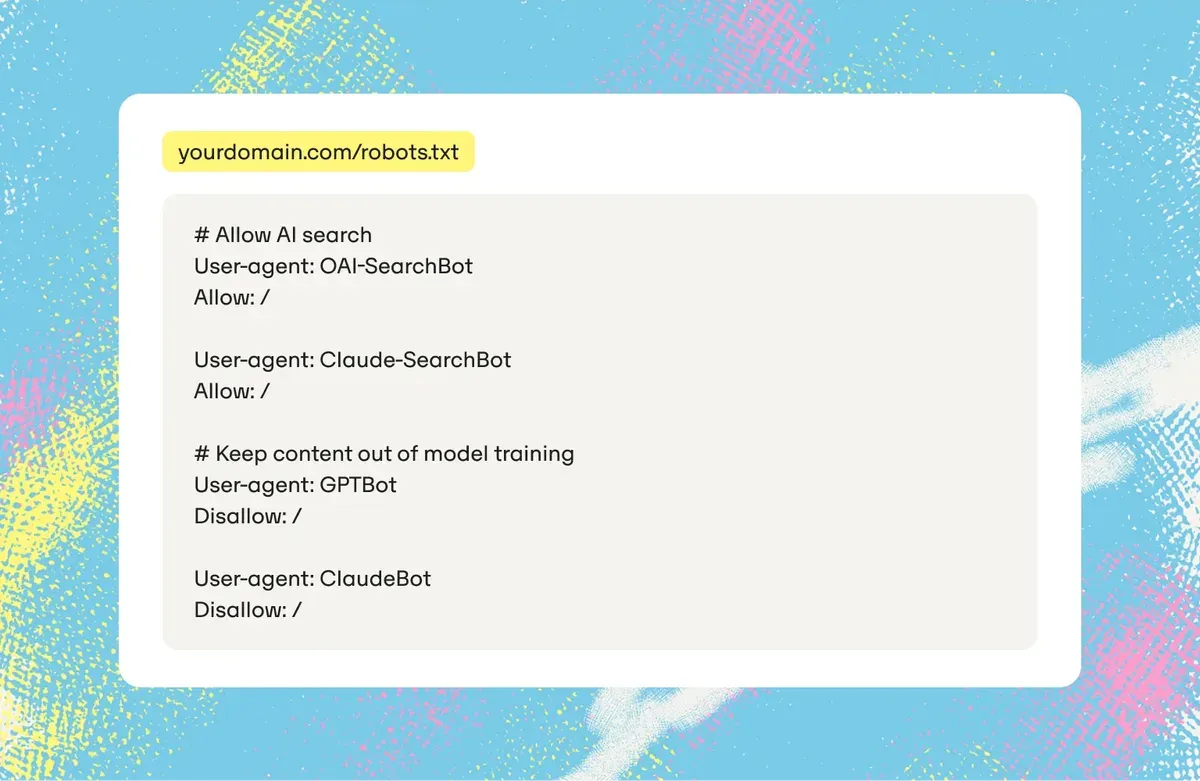
Allow search and user requests, block training:
User-agent: OAI-SearchBot
Allow: /

User-agent: ChatGPT-User
Allow: /

User-agent: Claude-SearchBot
Allow: /

User-agent: Claude-User
Allow: /

User-agent: PerplexityBot
Allow: /

User-agent: GPTBot
Disallow: /

User-agent: ClaudeBot
Disallow: /

User-agent: Google-Extended
Disallow: /
Allow everything: no AI-specific rules are needed, as long as nothing else in your robots.txt blocks these bots by accident. Check for a blanket Disallow: / under User-agent: *.
Block all AI bots: list each training, search and user agent, such as ChatGPT-User or Meta's meta-externalagent, with Disallow: /, then enforce the block at the network level, since user-triggered fetches may not follow robots.txt.
User agent strings are easy to fake, which makes IP-based checks more reliable. OpenAI, Anthropic and Perplexity publish the IP ranges of their bots; check requests against those ranges before you trust or block a crawler by user agent alone.
Robots.txt asks; CDNs and firewalls can enforce, including against scrapers that ignore it. Cloudflare, for example, began blocking AI crawlers by default for new domains in July 2025 and offers a pay per crawl option, so check your CDN settings: you may be blocking AI search bots without knowing it.
An llms.txt file can suggest pages to AI tools, but it gives you no control over crawler access. Our guide to what llms.txt does and doesn't do explains the difference.
Your server or CDN logs show every request with its user agent. To size your AI crawler traffic, filter for the agents in the table above, check them against the published IP ranges, and look at which pages they fetch and how often. For a market-wide view, Cloudflare Radar publishes data on AI bot traffic and on how much each AI platform crawls compared with the referral traffic it sends back.
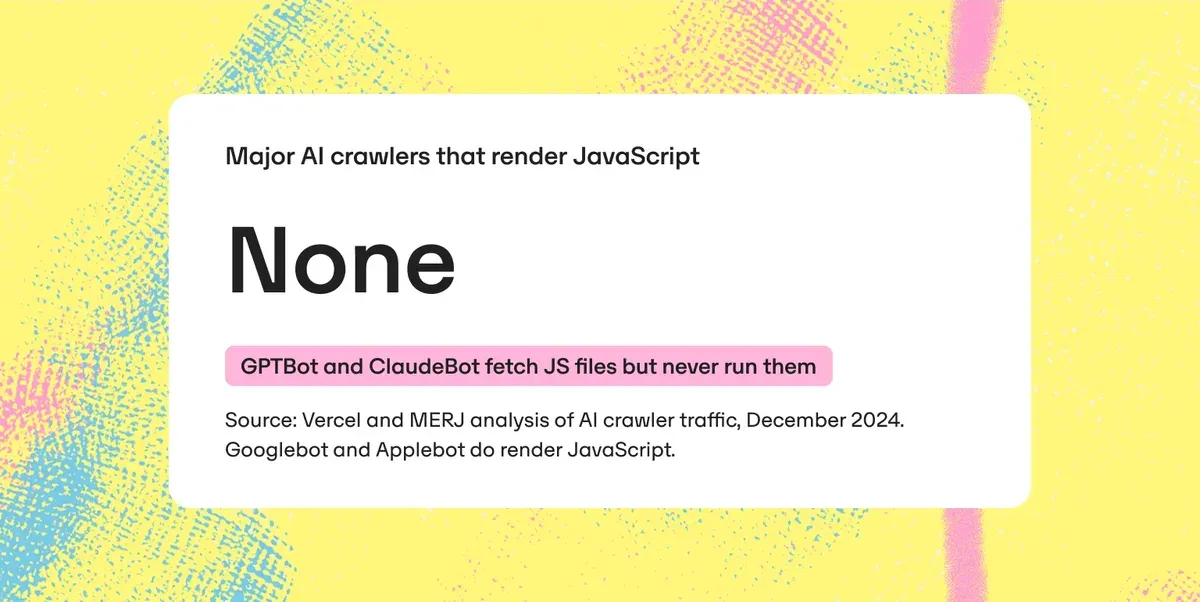
While you are in the logs, check what the bots actually receive. Vercel's analysis of AI crawler traffic (December 2024, with data from MERJ) found that none of the major AI crawlers render JavaScript; the ChatGPT and Claude crawlers download JavaScript files but never run them.
Gemini, which uses Googlebot's infrastructure, and Applebot were the exceptions. If your key content, pricing or structured data only appears after client-side rendering, most AI crawlers never see it. Serve it in the HTML, and add structured data the same way, as covered in our guide to schema markup for AI search.
If AI visibility matters to you, the search and user bots are not optional: they are how ChatGPT, Claude and Perplexity read you when it counts. Allow them, verify them, and make sure your important content is in plain HTML. Treat training bots as a deliberate business choice rather than a default, and revisit it as your content and market change.
Access is only the first step. Once the bots can read you, what matters is whether AI engines cite you, and which sources they choose instead. That is what Omnia tracks across ChatGPT, Perplexity, Google AI Overviews and AI Mode, and what the Omnia Agent turns into work your team can ship, including the pull request that updates your robots.txt. For what comes after access, see our guides to earning citations in ChatGPT, tracking AI Mode and answer engine optimization.
Omnia offers a 14-day free trial on the Growth plan.
No credit card required. See exactly where your brand shows up (or doesn't) across AI engines, then let the platform's recommendations guide your next move.

GPTBot is OpenAI's crawler for collecting content that may be used to train its models. It is separate from OAI-SearchBot, which powers ChatGPT's search features.
No. ClaudeBot is Anthropic's web crawler for collecting training data. Clawdbot was an unrelated open-source AI assistant, since renamed OpenClaw, which is why searches for "claudebot" often show both.
Not from ChatGPT search. OpenAI treats GPTBot and OAI-SearchBot as separate settings, so you can block training while still appearing in ChatGPT's search answers, as long as OAI-SearchBot is allowed.
No. Google-Extended controls the use of your content for Gemini training and grounding, and Google says it does not affect inclusion in Google Search, which includes AI Overviews and AI Mode.
OpenAI and Anthropic say their bots follow it, with OpenAI noting that robots.txt may not apply to user-initiated ChatGPT actions. Perplexity says its user-triggered fetcher generally ignores robots.txt, and Cloudflare reported in August 2025 that Perplexity bypassed blocks with undeclared crawlers, which Perplexity disputed. Use network-level controls if you need enforcement.
Block the AI companies' training and search bots by name, and use the Google-Extended token for Gemini training. Never block Googlebot unless you want to leave Google Search entirely.
Written By
 Alfredo BernalOrganic Growth LeadatOmniaAlfredo BernalOrganic Growth LeadatOmnia
 Alfredo BernalOrganic Growth LeadatOmnia
 Alfredo BernalOrganic Growth LeadatOmnia
 Alfredo BernalOrganic Growth LeadatOmnia
 Alfredo BernalOrganic Growth LeadatOmnia
No credit card required · Free for 14 days · See your AI visibility within 3 minutes