
AI Search Visibility
How We Fixed Our Own AEO in a Single Day by Leaving Webflow for Astro

 Miguel FernándezFounder & CTOatOmnia
 Alfredo BernalOrganic Growth LeadatOmnia
TL;DR
llms.txt is a short Markdown file at the root of your website that lists and summarizes your most important pages for AI tools. Google Search says you don't need it to appear in AI Overviews or AI Mode, and the only published log study shows AI bots rarely request it. Google's Chrome team, meanwhile, now checks for the file in an experimental Lighthouse audit for AI agents. If AI agents or developers use your site, add a clean file: our free llms.txt generator builds one in seconds. Then put your real effort into the pages AI engines actually cite.
llms.txt is a proposed standard, published by Jeremy Howard on llmstxt.org in September 2024, for a Markdown file that sits at yourdomain.com/llms.txt. Its job is to give large language models a curated, plain-text map of a website's key information: who you are, what you offer, and which pages matter most, without making a model wade through navigation, scripts and layout.
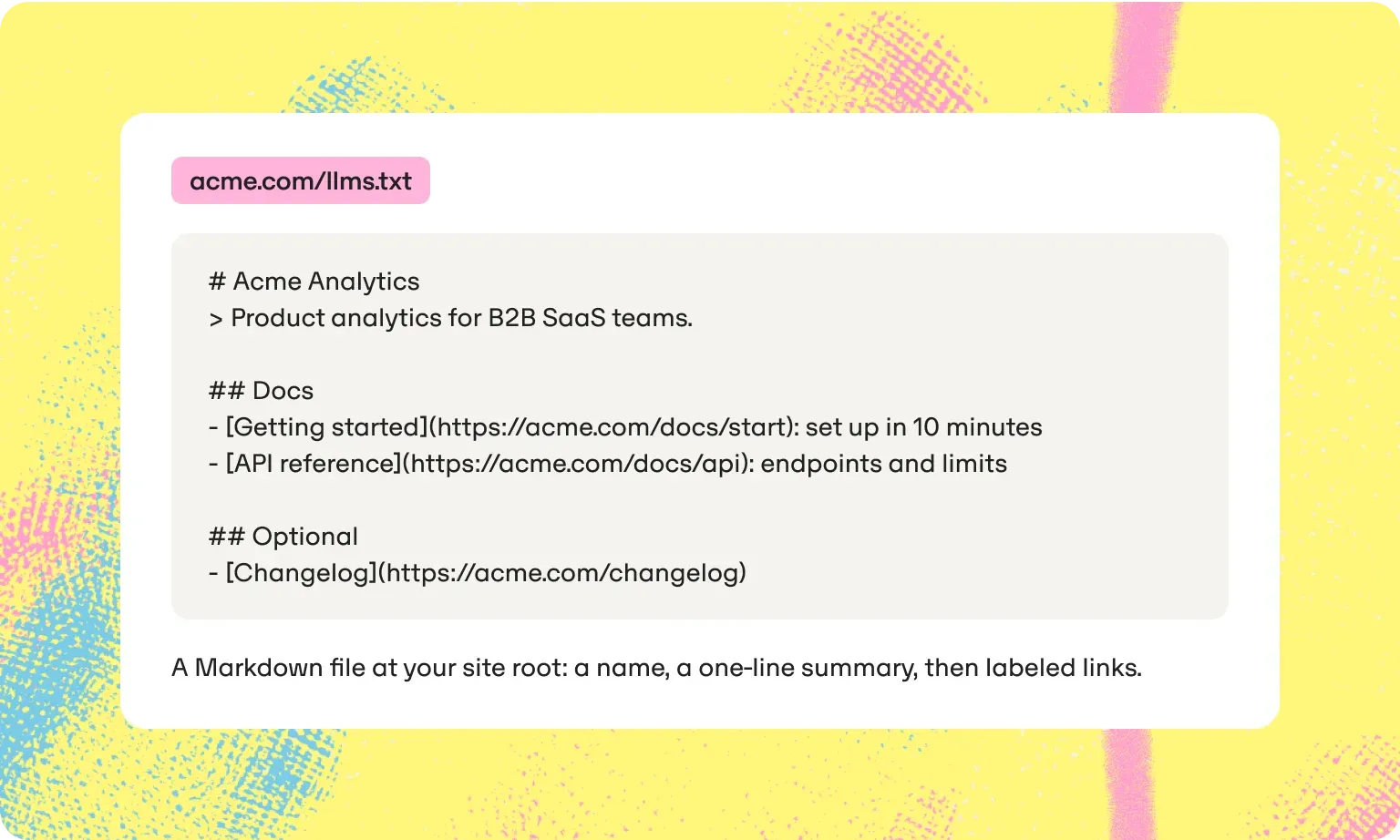
The format is deliberately simple. The file opens with an H1 carrying the site or company name, followed by a short summary in a blockquote.
Below that come sections, each with an H2 and a list of links, where every link carries a short description of the page it points to, such as "API reference: endpoints and limits". An optional section at the end holds pages that are useful but can be skipped. Some sites also publish llms-full.txt, a companion file popularized by Mintlify and Anthropic that contains the full text of the key pages in a single document, so AI tools get the full context instead of a list of links. You will sometimes see the file written as llm.txt; the proposal uses the plural, llms.txt.
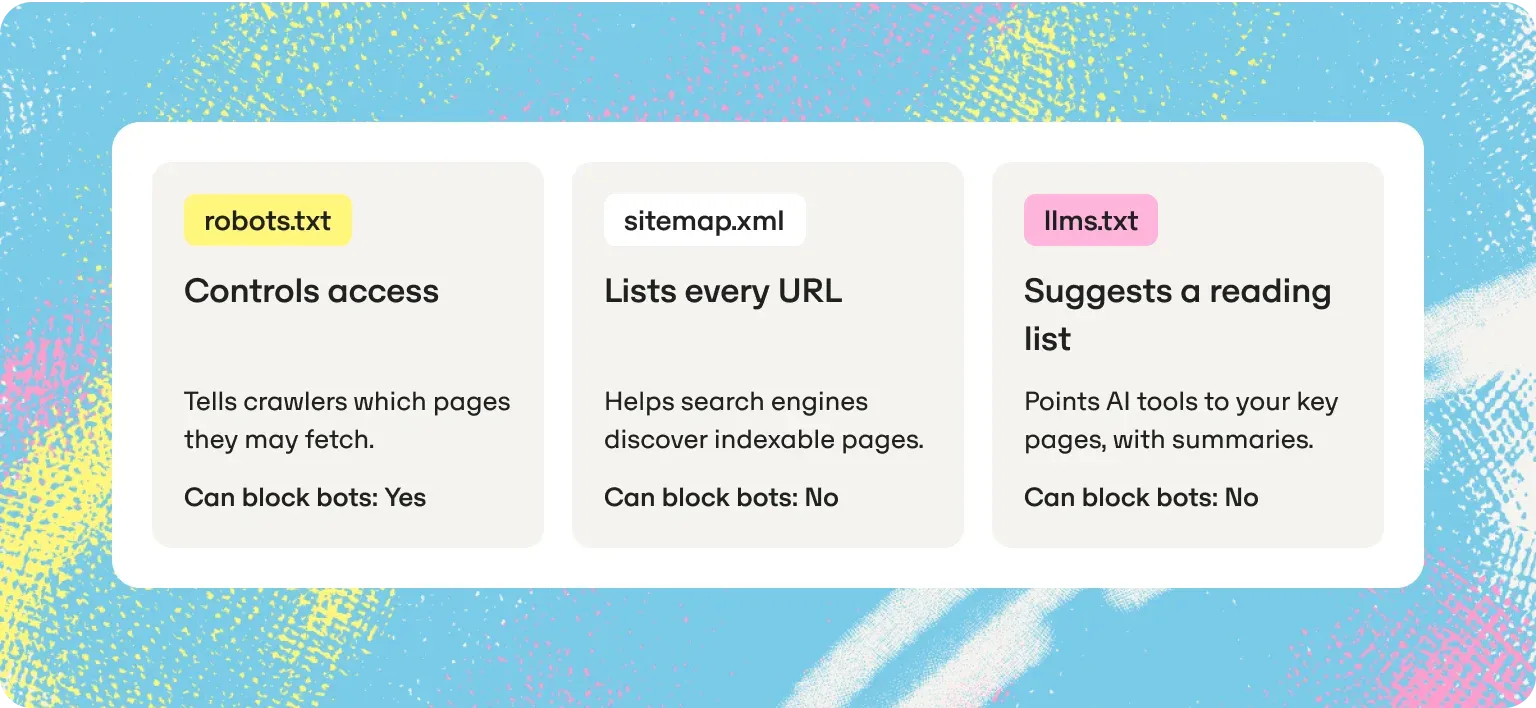
The three files are easy to confuse because they all sit at the root of a site and all talk to machines. They serve different purposes.
| File | What it does | Gives crawlers instructions? | Who reads it |
|---|---|---|---|
| robots.txt | Tells crawlers which pages they may fetch | Yes: it can allow or block specific bots by user agent | Search engine crawlers and AI crawlers that follow the standard |
| sitemap.xml | Lists every URL you want discovered | No | Search engines |
| llms.txt | Suggests a short reading list of your key pages, with summaries | No | AI tools and agents that choose to look for it |
The practical consequence: an llms.txt file cannot keep an AI bot, or any other web crawler, out of anything, and it cannot invite one in. If you want to control which AI crawlers can access your site, that is robots.txt territory, covered in the crawler access step of our AEO audit guide.
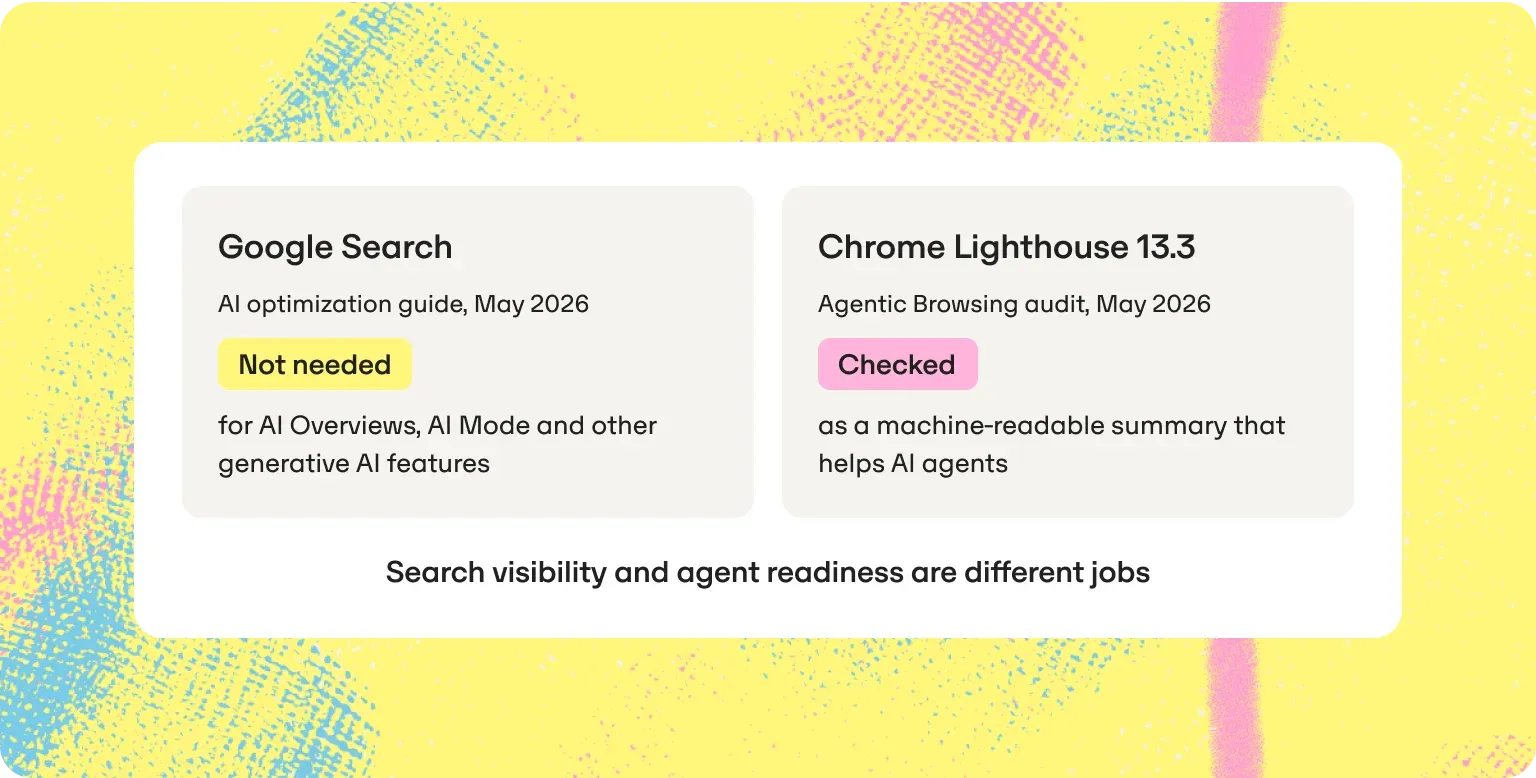
Google has given two different answers, depending on which team you ask.
Google Search's answer is clear. Its guide to optimizing for generative AI features, published in May 2026, says you don't need new machine-readable files, AI text files, markup or Markdown to appear in Google Search, and it treats content chunking, AI-specific rewriting and special schema as myths too. A June 2026 update added that Google Search ignores llms.txt files: they neither help nor hurt, and keeping one for other services is fine. That position is consistent with what Google's Search team has said for more than a year.
In April 2025, John Mueller compared llms.txt to the keywords meta tag, noting that no AI service had said it uses the file and that server logs show bots don't even check for it. In February 2026 he went further on separate Markdown pages for bots: "Converting pages to markdown is such a stupid idea." At Search Central Live Deep Dive Asia Pacific in July 2025, Gary Illyes said Google doesn't support llms.txt and isn't planning to.
Chrome's answer is different. A week before the Search guide appeared, Lighthouse 13.3 added an experimental Agentic Browsing category to its default audits, and that category includes an llms.txt audit. It checks whether a site provides the file and flags server errors when it cannot be retrieved. Chrome's documentation describes llms.txt as a machine-readable summary of a website's content for LLMs and AI agents, and warns that without it, agents may spend more time crawling a site to understand its structure. Sites that return a 404 for the file are marked not applicable rather than failed.
As Search Engine Journal pointed out, the two positions answer different questions. Search is talking about visibility in AI Overviews and AI Mode. Lighthouse is talking about how easily a browser-based AI agent can understand your site.
Keep those two jobs apart and the contradiction disappears.
The evidence so far says it makes little difference to whether AI search engines find and cite you.
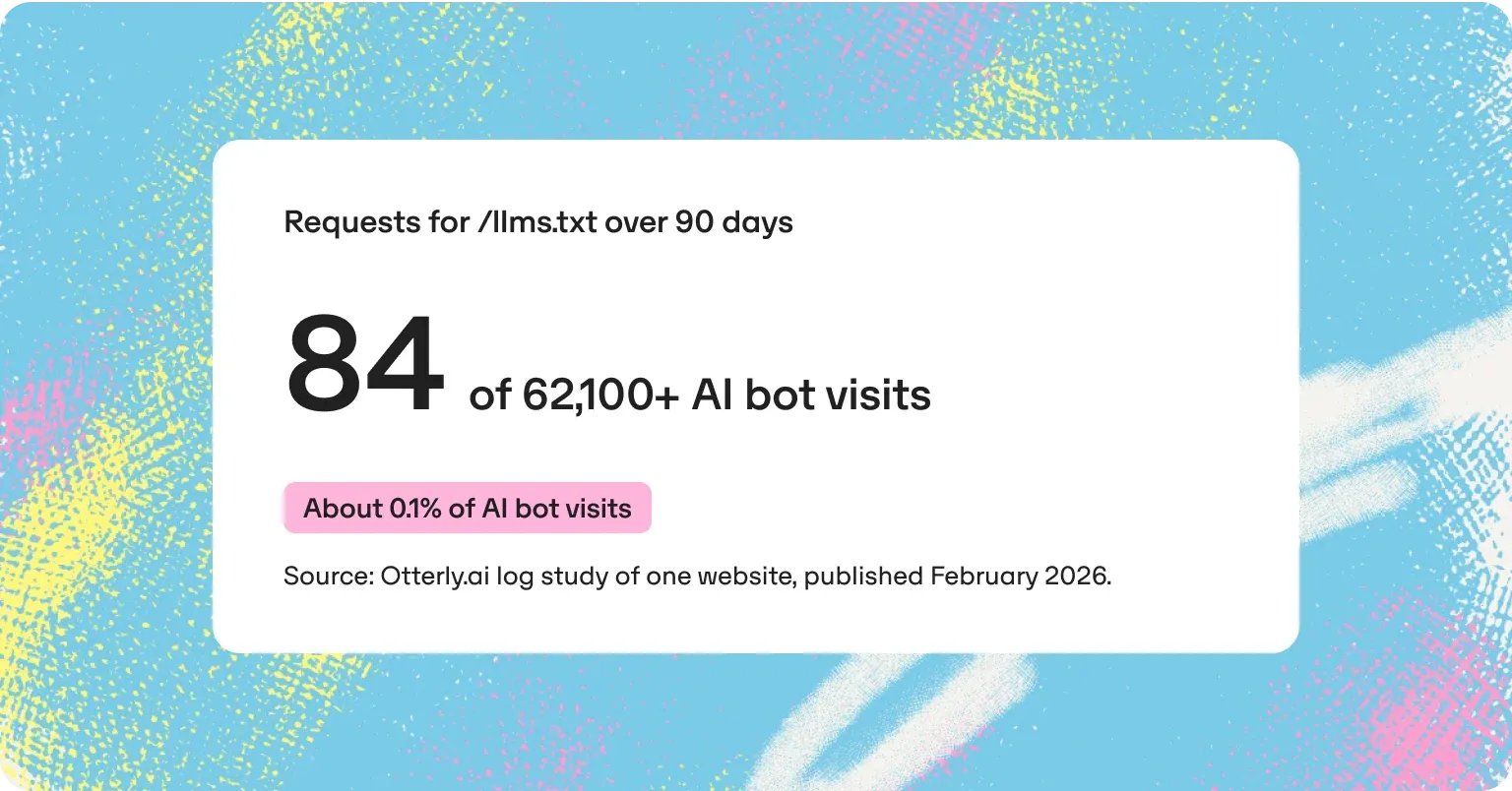
The most detailed published log analysis comes from Otterly.ai, which tracked AI bot traffic on one website over 90 days and published the results in February 2026. Out of more than 62,100 visits from AI bots, 84 requested /llms.txt: about 0.1%. An average content page on the same site drew about 265. That is one site, so it cannot speak for every industry, but it matches Google's statement that bots were not asking for the file.
Peec AI, another AI visibility vendor, reached a similar conclusion in July 2025 from a different direction. Its analysis found the file worth adding when AI agents and coding tools are your audience, a distraction for teams chasing traffic from ChatGPT or Perplexity, and potentially harmful where teams create Markdown copies of every page, because those copies add duplicate URLs with no demonstrated benefit.
What the studies do not show matters as much as what they do. Neither measured whether adding the file changed how often a brand is mentioned or cited in AI answers, and nothing published so far does. What AI engines cite is the content on your pages and what other trusted sites say about you. The file can point to that content; it cannot replace it. If you want to see which of your pages AI engines actually cite today, start with tracking AI citations.
The case for llms.txt is strongest where an AI system reads your site on someone's behalf, rather than where it builds a search answer.
AI agents browsing for a user are the clearest example, and the reason Chrome's Lighthouse audit exists. An agent that has to complete a task on your site, such as comparing plans or finding a setup guide, benefits from a short map of where things live.
Coding assistants, coding agents and developer tools are the second. Documentation platforms adopted llms.txt early because developers point tools such as Cursor or Claude at software documentation, and a clean index helps those tools find the right page. If you are new to how AI assistants connect to outside tools and data, our beginner's guide to MCP covers the basics.
Third-party tools that ingest a site without crawling every page also benefit. For API-first and documentation-heavy companies, all three use cases are real today. For most marketing sites, they are a small share of how AI systems encounter the brand.
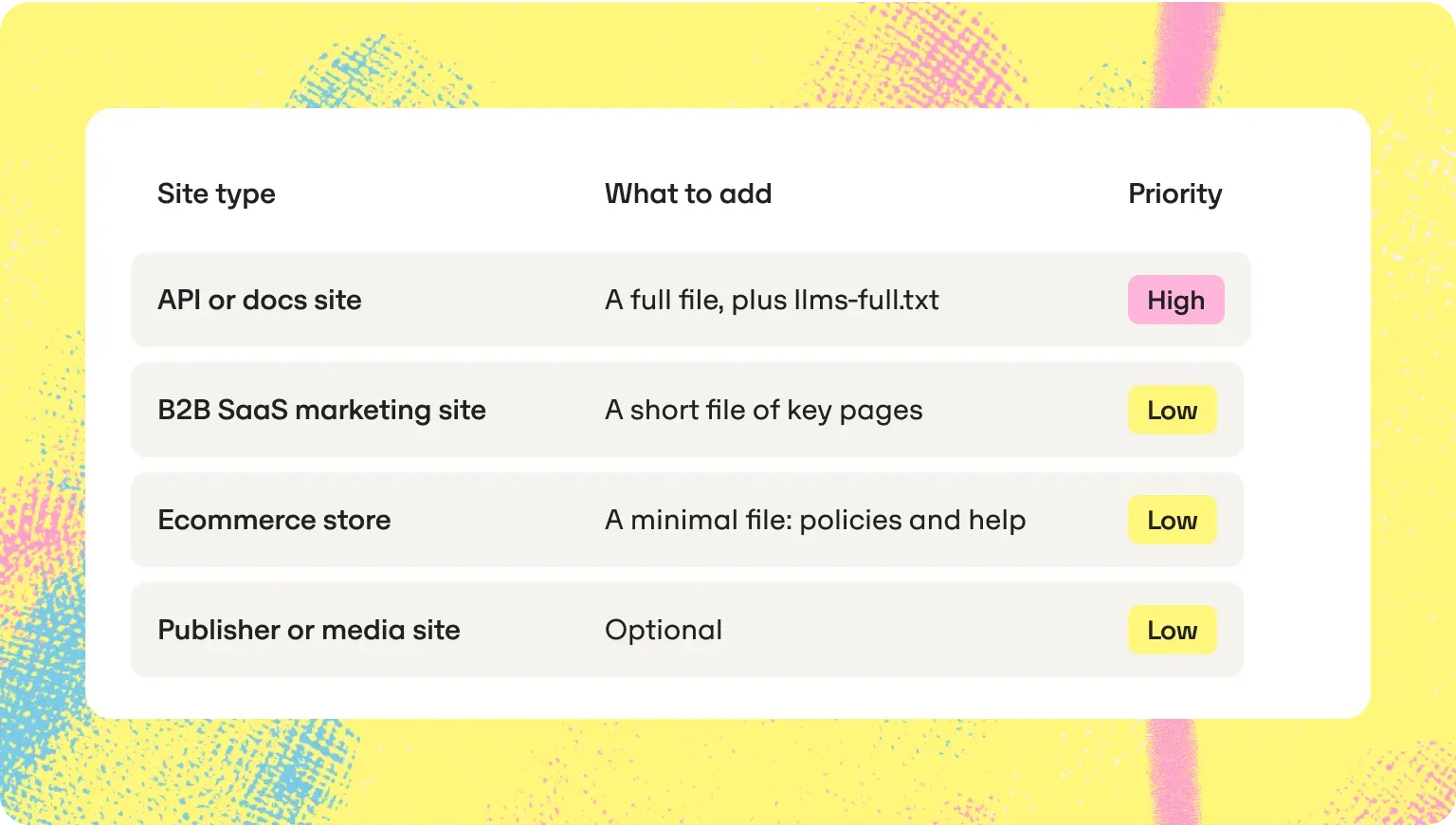
The effort is small, so the decision comes down to who reads your website.
| Site type | What to add | Priority |
|---|---|---|
| API or documentation site | A full llms.txt, and consider llms-full.txt | High |
| B2B SaaS marketing site | A short file pointing to product pages, pricing, docs and key guides | Low |
| Ecommerce store | A minimal file pointing to policies, shipping, returns and help pages | Low |
| Publisher or media site | Optional | Low |
One firm recommendation applies to every site type: do not create Markdown copies of every page for bots. Google's Search team has spoken against it, it multiplies URLs, and no published evidence shows a benefit.
The fastest route is our free llms.txt generator: enter your domain and it returns a clean, valid llms.txt in seconds. Review the pages and descriptions it picked against the first three steps below, then upload it. Writing the file by hand takes about ten minutes.
On WordPress, Yoast SEO and Rank Math can also generate the file. Otherwise, here is a skeleton you can adapt, for a fictional company:
# Acme Analytics

> Product analytics for B2B SaaS teams, with self-serve dashboards and a public API.

## Product
- [Pricing](https://acme.com/pricing): plans, limits and what each includes
- [Integrations](https://acme.com/integrations): supported data sources and tools

## Docs
- [Getting started](https://acme.com/docs/start): set up tracking in 10 minutes
- [API reference](https://acme.com/docs/api): endpoints, authentication and rate limits

## Optional
- [Changelog](https://acme.com/changelog): product updates by month
Teams that keep their website in a GitHub repository can have the Omnia Agent open the pull request that adds the file, so the task takes minutes and goes through normal review.
llms.txt is one of three technical files and signals that come up in every AI search checklist. The other two are crawler access, covered in our AEO audit guide, and structured data, covered in our guide to structured data for AI search.
llms.txt costs almost nothing, so add it if AI agents or developers use your site: generate it free, review it, upload it. Keep it short, keep it accurate, and update it when your key pages change.
Then stop. The file will not earn you citations in ChatGPT, Perplexity, AI Overviews or AI Mode, and treating it as an AI visibility lever pulls time away from the work that does: pages that answer buyers' questions clearly, facts that are consistent everywhere they appear, and mentions on the sites AI engines already trust. Knowing which of your pages get cited, and which pages get cited instead of yours, tells you where that effort should go. That is what Omnia tracks across AI engines, and what the Omnia Agent turns into work your team can ship. For the next step after the file, see our guide to ranking in ChatGPT search and our introduction to answer engine optimization.
Omnia offers a 14-day free trial on the Growth plan.
No credit card required. See exactly where your brand shows up (or doesn't) across AI engines, then let the platform's recommendations guide your next move.

OpenAI has not said whether ChatGPT reads llms.txt files. The only published log study, a 90-day analysis of one site, found that about 0.1% of AI bot visits requested the file.
Google Search says it ignores llms.txt and that you don't need the file for AI Overviews or AI Mode. Separately, Chrome's Lighthouse checks for llms.txt in its experimental Agentic Browsing category, as an aid for AI agents.
No. llms.txt only suggests pages to read; it has no allow or block instructions. Use robots.txt to control which crawlers can access your site.
There is no evidence that it affects rankings or AI citations, and Google Search says the file neither helps nor hurts. Its benefit, where there is one, is helping AI agents and developer tools understand your site.
A companion file that contains the full text of your key pages in one Markdown document, instead of links, so AI tools get the detail rather than a summary. It is most useful for documentation sites read by coding assistants.
No. Google's Search team has spoken against it, it creates duplicate URLs, and there is no published evidence that it helps.
Enter your domain in Omnia's free llms.txt generator and you get a clean, valid llms.txt in seconds. Review the pages and descriptions it picked, then upload the file to the root of your site.
Open yourdomain.com/llms.txt and confirm it loads as plain text with a 200 status. Then run Lighthouse with the Agentic Browsing category, which reports whether it found the file or hit a server error.
Written By
 Alfredo BernalOrganic Growth LeadatOmniaMiguel FernándezFounder & CTOatOmnia
 Jose Luis García del RíoGrowthatOmnia
 Jose Luis García del RíoGrowthatOmnia
 Miguel FernándezFounder & CTOatOmnia
 Jose Luis García del RíoGrowthatOmnia
No credit card required · Free for 14 days · See your AI visibility within 3 minutes